Raindrop.io has been the polished cross-platform bookmark manager for years. The 2026 changes — Pro at $4/month, free-tier collection caps, and a new AI tagging tier — moved a chunk of its user base to start looking. After Pocket’s July 2025 shutdown sent waves of refugees into the bookmarking space, several open-source and self-hosted alternatives have caught up fast. These Raindrop alternatives cover the realistic swaps in 2026.
This piece focuses on desktop tools across Windows, macOS, and Linux. We compared web clipping, tag systems, AI features, full-text search of archived content, and how each tool handles sharing. Whether we want a tool we own outright or a polished hosted alternative, one of these will fit.
Quick comparison
| App | Best for | Free option | Paid starting price | Self-hosted |
|---|---|---|---|---|
| Karakeep | Self-hosted AI-tagged bookmarks | Yes (FOSS) | Free | Yes |
| Linkwarden | Bookmark + archival snapshots | Yes (FOSS) | $4/month hosted | Yes |
| Linkding | Tag-centric minimal manager | Yes (FOSS) | Free | Yes |
| Pinboard | Tag-first, no-frills service | Trial | $22/year | No |
| Anybox | Native Mac bookmark vault | Yes (limited) | $14.99 one-off | No |
| GoodLinks | Read-later + bookmark on Apple | No (trial) | $9.99 one-off | No |
| Hoarder | Open-source bookmark + AI | Yes (FOSS) | Free | Yes |
| Bookmark OS | Visual file-system bookmarks | Yes (limited) | $3/month | No |
Why people leave Raindrop.io
Pro is now $4/month or $36/year. The free tier added a collection cap (5 in 2026, down from unlimited), AI tagging is Pro-only, and full-text search now lives behind Pro too. Power users hit the wall fast.
Hosted service, not self-hosted. All bookmarks live on Raindrop’s servers. For users who want full data ownership — especially after the Pocket sunset — that is the dealbreaker.
No first-party Linux desktop app. The web app and PWA work on Linux, but there is no native client. Anyone on Pop!_OS, Fedora, or SteamOS feels like a second-class user.
AI features feel bolted on. Raindrop’s AI tagging arrived later than Karakeep’s and Linkwarden’s, and the implementation depends on an internal provider rather than a local model. Privacy-conscious users prefer the local-LLM options.
Sharing model is awkward. Public collection links work, but team sharing is gated behind the Pro tier and the permission model is coarse — view or edit, not much in between.
If any of that sounds familiar, these are the Raindrop alternatives worth considering.
The 8 best Raindrop.io alternatives for desktop
Karakeep — best self-hosted modern bookmark manager
Karakeep is the self-hosted bookmark and read-later app that has dominated the 2026 self-hosting conversation. The single-container Docker install is straightforward, the web UI is clean, and the Ollama integration tags and summarises bookmarks using a local LLM.
For Raindrop power users who want full data ownership, Karakeep is the closest like-for-like swap. Collections, tags, search, and a proper reader view all line up with what Raindrop offers — plus local AI.
Where it falls short: AI features need Ollama running somewhere with enough RAM for a small model. Visual collection layout (Raindrop’s grid view) is functional but not as glossy. No native desktop client yet.
Pricing:
- Free: full feature set self-hosted
- Paid: none (yet)
- vs Raindrop: free and self-hosted vs $4/month hosted
Download: karakeep.app (Docker on Windows, macOS, Linux)
Bottom line: Pick Karakeep if we want Raindrop-style polish on our own server with AI tagging. Skip it if we cannot run Docker or Ollama.
Linkwarden — best archive-first bookmark manager
Linkwarden treats every link as something worth archiving. Each saved bookmark stores a full HTML snapshot, a screenshot, and a PDF — so even if the original site disappears, the content is preserved. The collection model is similar to Raindrop’s, with nested folders, tags, and full-text search across archives.
For users who care about long-term archival as much as bookmarking, Linkwarden is the strongest pick. The hosted Cloud tier at $4/month matches Raindrop Pro’s price.
Where it falls short: Storage adds up — full-page snapshots are 1-3 MB each, so a thousand bookmarks needs a few GB. The reader view is functional but trails Karakeep’s. Mobile apps are recent and still improving.
Pricing:
- Free: self-hosted
- Paid: Linkwarden Cloud at $4/month
- vs Raindrop: same hosted price, more archival features
Download: linkwarden.app (Docker on Windows, macOS, Linux)
Bottom line: Pick Linkwarden if archival matters as much as bookmarking. Skip it if storage is tight or the reader view needs to be best-in-class.
Linkding — best minimalist tag-first manager
Linkding is the small, fast bookmark manager that punches above its weight. The interface is plain HTML — almost no JavaScript — and it loads instantly even on a Raspberry Pi. The tag model is the centerpiece, with autocomplete, bulk editing, and a clean tag-cloud view.
For users coming from Pinboard or Delicious, Linkding is the spiritual heir. It deliberately does less than Karakeep or Linkwarden, and that is the point.
Where it falls short: No first-party mobile apps (third-party LinkdinAndroid covers Android). AI tagging is not built-in. Archival snapshots are optional. Reader view is basic.
Pricing:
- Free: full feature set self-hosted
- Paid: none
- vs Raindrop: smaller scope, free
Download: github.com/sissbruecker/linkding (Docker on Windows, macOS, Linux)
Bottom line: Pick Linkding if speed and simplicity matter most. Skip it if we want a reader or visual layout.
Pinboard — best for tag-first archive purists
Pinboard has been the no-frills bookmarking service since 2009. The interface is the same as it was a decade ago — plain HTML, fast tags, instant search — and the maintainer charges a flat $22/year for the standard plan or $39/year for archival, which keeps full HTML copies of every bookmarked page.
For users who want a tool that does not change and will not get acquired, Pinboard is the most predictable pick on this list.
Where it falls short: Looks frozen in 2010. No AI. No native apps (third-party iOS and Android clients exist). The single-developer model means slow feature work.
Pricing:
- Free: $11 one-time signup (not a free tier — onboarding fee)
- Paid: $22/year standard, $39/year archival
- vs Raindrop: cheaper annually, vastly less polished
Download: pinboard.in (web)
Bottom line: Pick Pinboard if longevity and predictability matter more than features. Skip it if a 2010-era UI feels like work.
Anybox — best native Mac bookmark vault
Anybox is the Mac-native bookmark manager that takes Apple’s design conventions seriously. The desktop app is fast, the iOS app syncs cleanly via iCloud, and the local-first model means our bookmarks live on our devices first and the cloud second.
For Mac and iOS users who do not need cross-platform sync, Anybox is the most polished native option. The one-off licence model is rare in this space.
Where it falls short: macOS and iOS only. No web app for Windows or Linux access. Some features are paywalled in the Pro tier even though the app is paid upfront.
Pricing:
- Free: limited
- Paid: $14.99 one-off for the base app
- vs Raindrop: cheaper long-term, Apple-only
Download: anybox.cc (macOS, iOS)
Bottom line: Pick Anybox if we are Apple-only and we like one-off licences. Skip it if we use Windows or Linux at all.
GoodLinks — best Apple-native read-later + bookmarks
GoodLinks is the Mac and iOS read-later app that doubles as a bookmark manager. It is opinionated, fast, and integrates with the system share sheet better than any tool on this list. The reader view is excellent, the tagging is fast, and the highlight model exports cleanly to Markdown.
For Apple-first users who want a tool that feels like part of macOS, GoodLinks is the cleanest fit.
Where it falls short: macOS and iOS only. No web app. Visual layouts (Raindrop-style grid view) do not exist. The one-off price is per-platform.
Pricing:
- Free: trial
- Paid: $9.99 macOS, $9.99 iOS (separate purchases)
- vs Raindrop: cheaper long-term, Apple-only
Download: goodlinks.app (macOS, iOS)
Bottom line: Pick GoodLinks if reader experience matters and we are Apple-only. Skip it if we need cross-platform support.
Hoarder — best community-led open-source pick
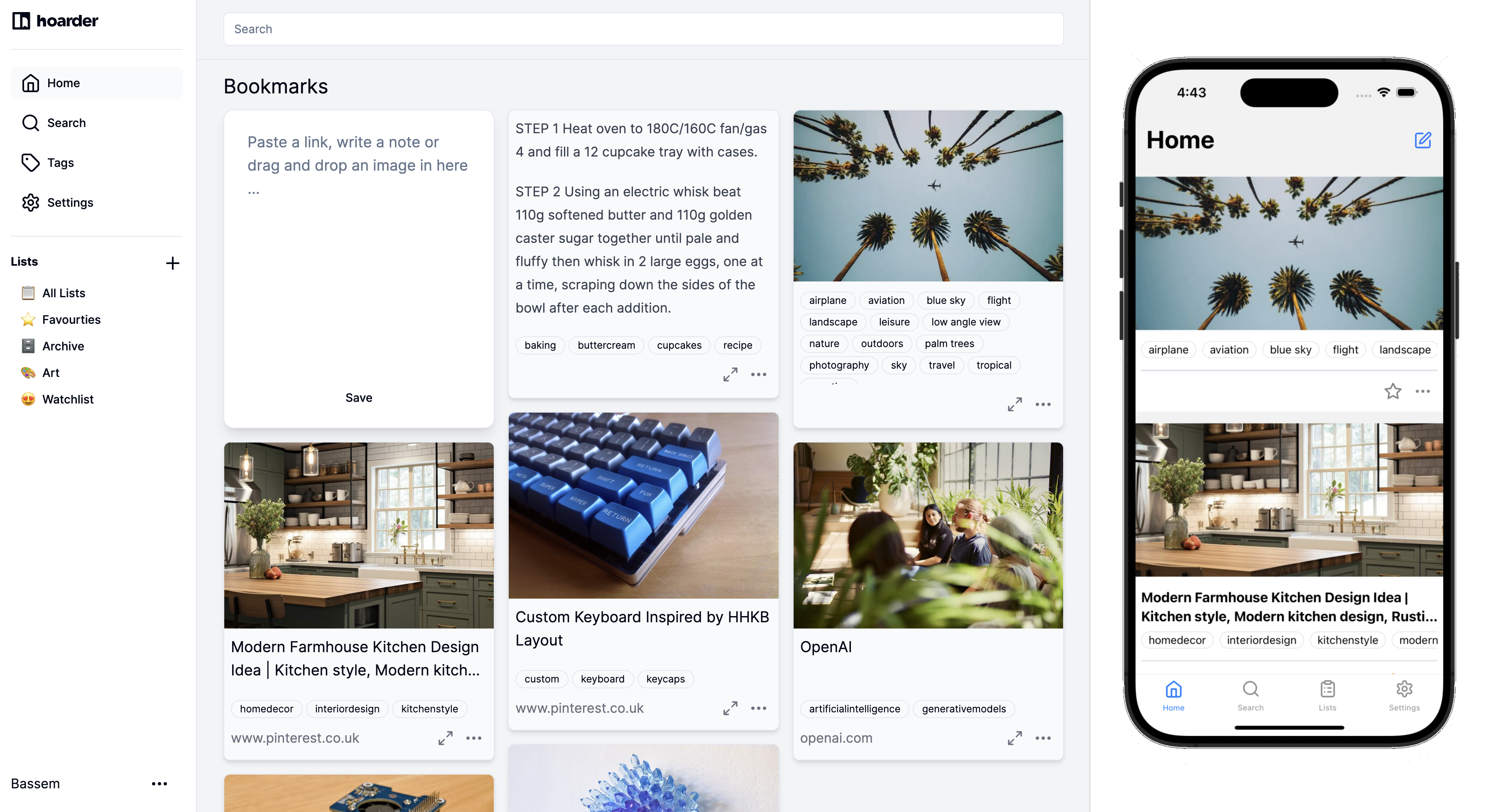
Hoarder is now part of the Karakeep project (Karakeep is the renamed Hoarder), but the Hoarder name still surfaces in older docs. For our purposes, “Hoarder” and “Karakeep” point to the same tool. If we see Hoarder in a Reddit post or HN comment from late 2025, it is the same recommendation as Karakeep above.
Where it falls short: The naming confusion is the main issue. Older instructions and screenshots reference “Hoarder” while the current project is “Karakeep.”
Pricing:
- Free: full feature set
- Paid: none
- vs Raindrop: free and self-hosted
Download: karakeep.app (Docker on Windows, macOS, Linux)
Bottom line: Hoarder is the old name for Karakeep — use Karakeep going forward.
Bookmark OS — best for visual file-system bookmarking
Bookmark OS treats bookmarks like files in a desktop file system. Folders, drag-and-drop, icons, a recycle bin — the metaphor is deliberate, and it works well for users who think in directory trees rather than tags. The browser extensions and mobile apps handle capture cleanly.
For visual thinkers who find tag-based tools confusing, Bookmark OS is the rare bookmark manager that picks a different mental model.
Where it falls short: Subscription model with a free tier that caps the bookmark count. The file-system metaphor adds friction if we just want fast tag-based retrieval. Less archival depth than Linkwarden.
Pricing:
- Free: 1,000 bookmark cap
- Paid: $3/month
- vs Raindrop: similar price, very different metaphor
Download: bookmarkos.com (web, browser extensions)
Bottom line: Pick Bookmark OS if folders feel right and tags feel wrong. Skip it if we like the Raindrop or Karakeep approach.
How to choose
Pick Karakeep if we want self-hosted Raindrop-style polish with AI tagging. It is the migration target most ex-Raindrop and ex-Pocket users land on.
Pick Linkwarden if archival matters and we want full HTML snapshots of every bookmark.
Pick Pinboard if we want a service that has not changed in 15 years and probably will not change in the next 15 either.
Pick Anybox or GoodLinks if we are fully on Apple platforms and we want native apps rather than web tools.
Stay on Raindrop if the Pro tier features (collaboration, AI tagging, full-text search) are worth the $4/month to us. The interface remains the most polished hosted option on the list.
FAQ
Is Karakeep free forever? Yes for the self-hosted version, which is MIT-licensed. The hosted Karakeep Cloud tier may launch as paid, but it cannot remove free self-hosting.
Can I import my Raindrop collections into Karakeep? Karakeep accepts CSV imports and works with Raindrop’s standard export format. Tags, collections, and titles transfer cleanly. Highlights do not export from Raindrop.
What is the cheapest Raindrop alternative? Free self-hosted picks (Karakeep, Linkwarden, Linkding) cost nothing if we already have a small server. Pinboard at $22/year is the cheapest paid hosted option.
Do I need to host Karakeep myself? Yes, for now. The maintainer has hinted at a hosted tier but it has not launched. A small Raspberry Pi 4 or any cheap VPS is enough.
Is Pocket really shutting down? Mozilla announced Pocket’s shutdown in May 2025, with the service ending July 8, 2025. Most refugees moved to Raindrop, Karakeep, Linkwarden, Readwise Reader, or Matter.