Pocket shut down in July 2025. Omnivore shut down in November 2024. Anyone tired of building reading habits on apps that vanish has been moving to self-hosted read-it-later tools. We tested eight of the strongest options on a Raspberry Pi 4, a Mac mini M2, and a small NUC running Ubuntu — covering Windows, macOS, and Linux self-hosting paths. Here are the best apps for self-hosted read-it-later on desktop in 2026.
We compared install difficulty (Docker vs binary), reader polish, AI features, mobile apps, browser extensions, and ecosystem maturity. Whether we want the cleanest reader, the most archival depth, or the simplest install, one of these will fit.
What to look for in a self-hosted read-later app
- Install difficulty. Single-binary or single-container installs (Readeck, Shiori, Karakeep) run on any small Linux machine in minutes. Multi-container setups (Wallabag) need extra plumbing.
- Reader polish. A pleasant typography panel and offline reader matter if we plan to actually read articles, not just hoard them.
- AI tagging and summaries. Karakeep, Linkwarden, and Lyrebird offer optional AI features that run against a local Ollama instance. Wallabag, Readeck, Linkding, and Shiori do not.
- Mobile apps. First-party apps for iOS and Android matter more than they used to — capturing from a phone is the dominant flow for most users.
- Browser extension quality. Chrome and Firefox extensions for one-tap save. Bookmarklets are a fallback but less convenient.
- Article extraction reliability. How well the tool pulls clean readable text from modern paywalled sites, Substack newsletters, and JavaScript-heavy pages.
Quick comparison
| App | Best for | Install | AI features | Mobile apps |
|---|---|---|---|---|
| Karakeep | Modern self-hosted with AI | Docker (1 container) | Yes (Ollama) | iOS + Android |
| Wallabag | Long-running stability | Docker (multi-container) | No | iOS + Android |
| Readeck | Clean reading focus | Single Go binary | No | Android, web PWA |
| Linkwarden | Bookmarks + archival snapshots | Docker (multi-container) | Optional | iOS + Android |
| Shiori | Minimalist Pocket clone | Single Go binary | No | Web PWA |
| Linkding | Tag-first bookmarks | Docker (1 container) | No | Web PWA |
| Pinry | Visual board self-host | Docker (1 container) | No | Web PWA |
| Lyrebird | AI-first self-hosted reader | Docker (multi-container) | Yes (built-in) | iOS + Android |
The 8 best self-hosted read-it-later apps
1. Karakeep — best overall pick
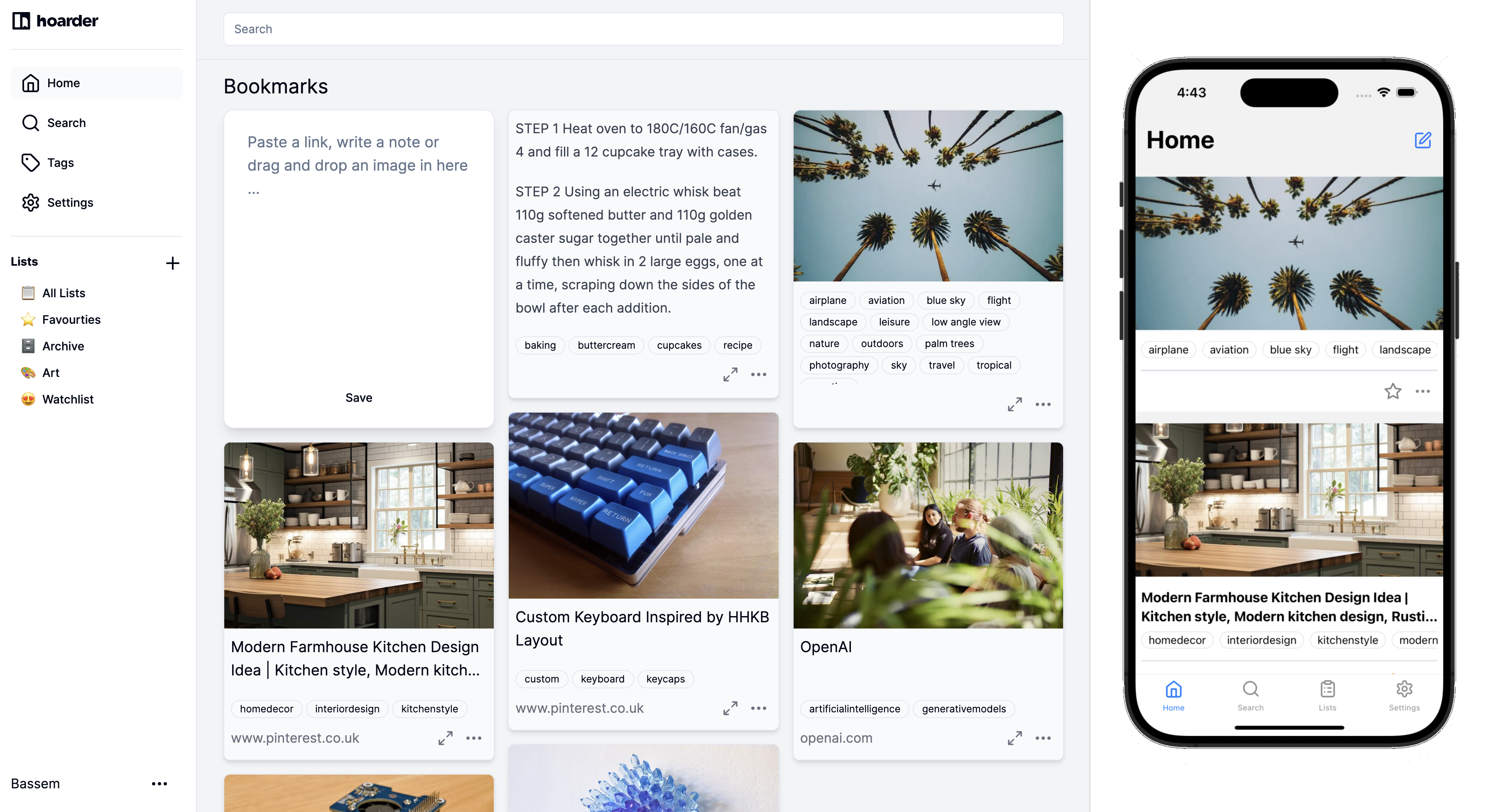
Karakeep (formerly Hoarder) is the breakout self-hosted reader of 2026. The single-container Docker install spins up in five minutes, the web UI is the cleanest in the category, and the Ollama integration tags and summarises articles using a local LLM. Browser extensions and mobile apps work reliably.
What sets Karakeep apart is the combination: modern UI + AI tagging + first-party mobile apps + active development. No other self-hosted tool combines all four.
Where it falls short: AI features need Ollama running somewhere with enough RAM (8 GB+ for a usable model). The maintainer is one developer with a small contributor pool, so velocity could slow.
Pricing: Free (MIT-licensed)
Platforms: Docker on Windows, macOS, Linux; iOS and Android apps
Download: karakeep.app
Bottom line: Pick Karakeep if we want the modern self-hosted experience. Skip it only if AI tagging is unimportant and we want something even simpler.
2. Wallabag — best long-running stability
Wallabag has been the open-source default since 2013. The 2026 release is stable, the ecosystem is the broadest (e-ink integrations, RSS, third-party tools), and the maintainer team is active. The web UI is dated, but everything works.
Where it falls short: Multi-container Docker setup. Dated UI. No AI features. Article extraction misses content from some modern paywalled sites.
Pricing: Free (open-source); hosted Wallabag.it at €11/year
Platforms: Docker on Windows, macOS, Linux; iOS and Android apps
Download: wallabag.org
Bottom line: Pick Wallabag if stability and ecosystem maturity matter more than a polished UI.
3. Readeck — best for clean reading
Readeck is the read-focused tool that gets typography right. The reader view is the most pleasant in this category — well-tuned line heights, multiple font families, dark mode that does not look like an afterthought. The install is a single Go binary, so we run it without Docker.
Where it falls short: No AI. No first-party iOS app (Android only). Smaller ecosystem than Wallabag.
Pricing: Free
Platforms: Single binary on Windows, macOS, Linux; Android app + web PWA
Download: readeck.org
Bottom line: Pick Readeck if reading polish matters and we want a no-Docker install.
4. Linkwarden — best for archival snapshots
Linkwarden stores a full HTML snapshot, PDF, and screenshot of every saved link. So even when the original site disappears, the content is preserved. Tags, collections, and full-text search across the archive are all built-in. AI tagging is opt-in.
Where it falls short: Storage adds up (1-3 MB per article for full snapshots). Reader view is functional but trails Karakeep and Readeck. Multi-container Docker setup.
Pricing: Free self-hosted; hosted Linkwarden Cloud at $4/month
Platforms: Docker on Windows, macOS, Linux; iOS and Android apps
Download: linkwarden.app
Bottom line: Pick Linkwarden if archival matters as much as reading.
5. Shiori — best minimalist pick
Shiori is the “simple clone of Pocket” by name and by design. The Go binary install is the fastest on this list — download, run, done. The interface is minimal, the feature set is intentionally small, and the page archiver captures content locally without third-party services.
Where it falls short: No AI. No native mobile apps. Tagging is basic. UI is functional but unadorned.
Pricing: Free
Platforms: Single binary on Windows, macOS, Linux; web PWA
Download: github.com/go-shiori/shiori
Bottom line: Pick Shiori if minimalism is the point.
6. Linkding — best for tag-first bookmarking
Linkding is the tag-centric bookmark manager that prioritises speed. The interface is plain HTML with almost no JavaScript, so it loads instantly on a Pi 4. The tag model is the centerpiece — autocomplete, bulk editing, tag clouds, and per-tag RSS feeds. A reader view is recent and improving.
Where it falls short: No first-party mobile apps. AI tagging not built-in. Reader view is acceptable but not exceptional.
Pricing: Free
Platforms: Docker on Windows, macOS, Linux; web PWA
Download: github.com/sissbruecker/linkding
Bottom line: Pick Linkding if tags and speed are what we value most.
7. Pinry — best for visual collection
Pinry is the rare self-hosted tool built around visual boards rather than text-heavy article lists. Each saved page captures a thumbnail and shows in a Pinterest-style grid. It is not the strongest reader, but if our reading list includes recipes, design references, and photo-heavy content, Pinry’s visual layout helps.
Where it falls short: Reader view is basic. No AI. Mobile experience is a PWA only.
Pricing: Free
Platforms: Docker on Windows, macOS, Linux; web PWA
Download: github.com/pinry/pinry
Bottom line: Pick Pinry for image-heavy collections; skip it for text-heavy reading.
8. Lyrebird — best AI-first self-hosted reader
Lyrebird is one of the newer entrants to this space, with built-in AI features (summarisation, semantic search, automatic tag suggestions) that do not depend on Ollama. It bundles its own small model. The trade-off is a heavier Docker stack and the need for at least 4 GB of RAM dedicated to the model.
For users who want AI features but cannot or will not run Ollama separately, Lyrebird packages everything.
Where it falls short: Heavier resource footprint than Karakeep + external Ollama. Smaller user base. The bundled model is less capable than running a larger Ollama model.
Pricing: Free (open-source)
Platforms: Docker on Linux primarily (Windows/macOS via Docker Desktop)
Download: github.com/lyrebird-app/lyrebird (search “Lyrebird read-later” on GitHub)
Bottom line: Pick Lyrebird if we want AI without managing a separate Ollama install.
How to pick the right one
If we want the simplest install: Shiori or Readeck (single binary, no Docker).
If we want AI tagging: Karakeep with Ollama, or Lyrebird with its bundled model.
If we want the deepest archival: Linkwarden with full snapshots.
If we want a tool that has not changed in years and will not change in the next few: Wallabag or Shiori.
If we want a visual layout for image-heavy reading: Pinry.
If we want strong mobile apps: Karakeep, Wallabag, or Linkwarden.
If we tried Karakeep and the AI features felt unnecessary: Readeck or Shiori.
FAQ
What is the best free self-hosted read-later app? Karakeep for most users in 2026. Wallabag is the safer pick if stability matters more than AI features. Readeck is the easiest install if we want to avoid Docker.
Do I need Docker to self-host? Karakeep, Wallabag, Linkwarden, Linkding, and Pinry use Docker. Readeck and Shiori ship as single Go binaries that run directly on Windows, macOS, and Linux. Lyrebird uses Docker but is Linux-first.
Can I import my Pocket or Omnivore data? Yes — all of these accept some form of import. Karakeep, Wallabag, and Linkwarden have first-party importers for Pocket. Karakeep has an Omnivore importer. The full-text snapshot is sometimes lost in the migration.
Can I run Karakeep on a Raspberry Pi? The base app yes (a Pi 4 with 4 GB RAM is enough). The AI tagging requires Ollama, which is too slow on a Pi — better to host Ollama on a separate machine (a Mac mini, NUC, or any small Linux server with 8 GB+ RAM).
Which self-hosted read-later app has the best mobile apps? Karakeep and Wallabag are tied — both have first-party iOS and Android apps that sync reliably. Linkwarden’s mobile apps are newer but improving fast.