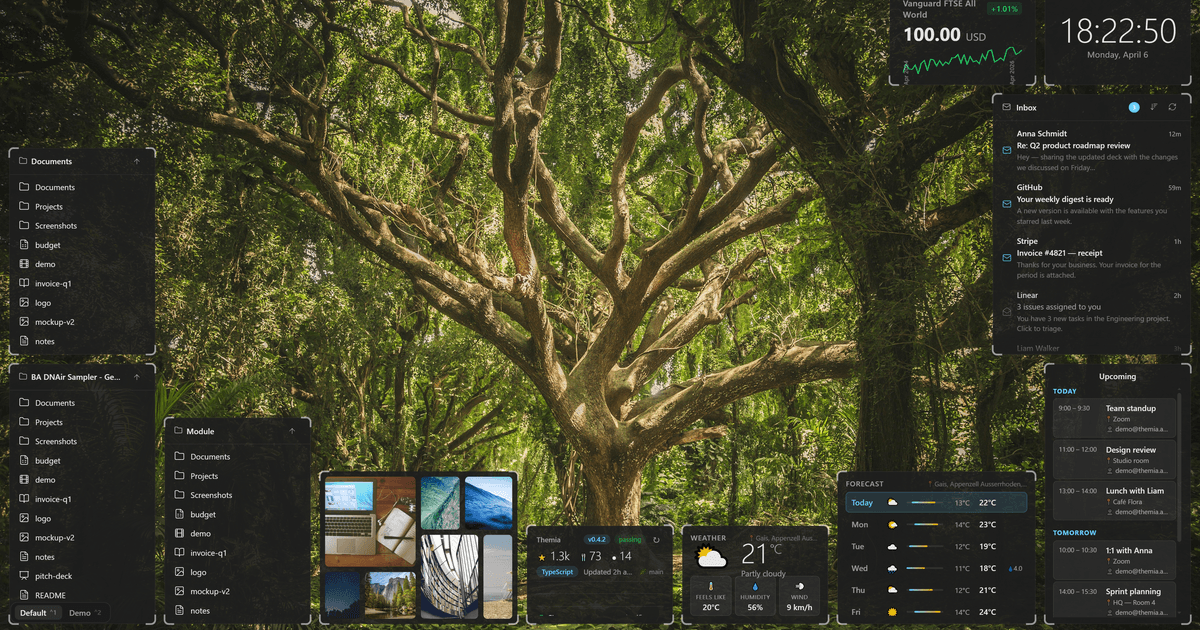
Themia is a small native Windows app that treats the desktop as a live dashboard, weather, calendar, email, GitHub, RSS, music controls, system stats, and to-do widgets pinned wherever you want them. It lands in a sweet spot Rainmeter never quite hit: real productivity widgets that mostly configure themselves.
If Themia is the shape you want but the specific app is not, these seven alternatives cover the ways to get there. Some are old-school customization powerhouses. Some are newer and lighter. One is the built-in Windows tool that most people never open.
Quick comparison
| App | Best for | Free plan | Starting price | Standout feature |
|---|---|---|---|---|
| Rainmeter | Deep visual customization | Fully free | Free | Skin library from 2011 onward |
| Seelen UI | Modern desktop overhaul | Fully free | Free | Full window tiling plus widgets |
| XWidget | Beginner-friendly widget engine | Free tier | $9.99 one-time | Built-in visual designer |
| Fences | Organizing an icon-heavy desktop | 30-day trial | $9.99 one-time | Snap desktop icons into groups |
| Libre Hardware Monitor | Live system telemetry | Fully free | Free | Only hardware read tool with real accuracy |
| Conky | Linux users who dual-boot | Fully free | Free | The reference for text-based system displays |
| Windows 11 Widgets Board | Built-in, zero-config | Fully free | Free | Ships with Windows |
Why people leave Themia
Themia is very good at what it does, but three patterns push users out. First, Themia is subscription-first at higher tiers, and some users want a one-time purchase or a fully free tool. Second, the widget catalog is fixed. Rainmeter’s twelve years of community skins vastly outnumbers what any single company can ship. Third, some users want more than widgets, they want desktop icon management, virtual desktop overhaul, or window tiling on top of the widget layer.
Each pick below targets one of those three gaps.
The alternatives
Rainmeter — Best for pure customization power
Rainmeter is the elder statesman of Windows desktop customization. Twelve years of community skins live at DeviantArt and the Rainmeter forums, and if you can imagine a desktop widget, someone has already built it. Rainmeter is fully open-source, fully scriptable, and works with dozens of data sources.
Where it falls short: The learning curve is steep. Rainmeter is a widget engine, not a curated widget suite; setting up something as basic as a working clock takes an hour if you have never used it. Bad skins can eat resources.
Pricing:
- Free: Fully free and open-source
Migrating from Themia: No importer. Pick a Suite from the community and modify it. The Enigma or Lines suites are common starting points.
Bottom line: Pick Rainmeter if you want maximum flexibility and are willing to invest a weekend learning the tool.
Seelen UI — Best for a full modern desktop overhaul
Seelen UI is one of the fastest-growing Windows customization projects of the last two years. It bundles a fresh taskbar, window tiling, virtual desktops, and a widget layer into a single package. Everything is configurable, and defaults are already sane.
Where it falls short: Seelen replaces enough of the Windows shell that it can conflict with other utilities. Some antivirus tools flag installs. Newer users may feel overwhelmed.
Pricing:
- Free: Fully free and open-source
Migrating from Themia: Seelen has its own widget shape that will not perfectly match Themia’s tile layout. Expect to redesign, not copy.
Bottom line: Pick Seelen if you want to overhaul the whole desktop, not just add widgets.
XWidget — Best for widget-building without code
XWidget is the friendliest widget engine on this list. A built-in visual designer lets you drag widget pieces into place, apply styles, and publish to the community gallery. The free tier ships with a solid starter pack; the paid tier unlocks premium widgets and cloud sync.
Where it falls short: The community gallery is smaller than Rainmeter’s. Some designs are dated. Cloud sync requires the paid tier.
Pricing:
- Free: Free tier with basic widgets
- Paid: One-time $9.99 for Pro
Migrating from Themia: No importer. The visual designer helps you recreate common Themia widgets quickly.
Bottom line: Pick XWidget if you want to design your own widgets without learning to script.
Fences — Best for taming a messy desktop
Fences from Stardock is different. It doesn’t add widgets; it organizes desktop icons into labeled, scrollable, collapsible containers. Combined with a Themia or Rainmeter setup, Fences handles the parts of the desktop the widget engines don’t.
Where it falls short: Not a widget tool. If you want dashboards, Fences alone is not the answer.
Pricing:
- Free: 30-day trial
- Paid: $9.99 one-time
Migrating from Themia: These tools are complements, not substitutes. Run both.
Bottom line: Pair Fences with your widget tool if your desktop is drowning in icons.
Libre Hardware Monitor — Best for accurate system telemetry
Libre Hardware Monitor is the fork that keeps the OpenHardwareMonitor project alive, and it is the reference tool for reading CPU temps, fan speeds, GPU load, and drive health on Windows. Rainmeter, Themia, and other dashboard tools pull data from it via a shared interface.
Where it falls short: The UI is a plain table. It is a data source, not a widget engine.
Pricing:
- Free: Fully free and open-source
Migrating from Themia: Not a replacement, a companion. Use it as the data source behind another widget engine.
Bottom line: Pick Libre Hardware Monitor if you care about telemetry accuracy above all else.
Conky — Best for Linux users who dual-boot
Conky is the Linux equivalent of Rainmeter, and it is the reference for text-based system monitors on any Unix-like system. If you dual-boot Linux and Windows and want a consistent look, Conky is one half of that. It runs on Windows via WSL or WSLg with some setup effort.
Where it falls short: Not a native Windows tool. Configuration is a Lua script. Setup on Windows is not for beginners.
Pricing:
- Free: Fully free and open-source
Migrating from Themia: Different world. Only worth the setup if Linux is your daily driver.
Bottom line: Pick Conky if Linux is your primary and Windows is your secondary.
Windows 11 Widgets Board — Best zero-effort option
Windows 11 Widgets Board is the tool everyone has installed and almost no one uses. It sits behind the widget button on the taskbar and hosts a curated set of widgets, weather, calendar, mail, sports, stocks, MSN news. It works, it is fast, it is free, and it never eats resources when you close the panel.
Where it falls short: The panel lives on the side of the screen, not on the desktop. Customization is thin. Third-party widget support is still limited.
Pricing:
- Free: Built into Windows 11
Migrating from Themia: Different model entirely. If you can accept “widgets are in a panel, not on the desktop,” this works out of the box.
Bottom line: Try the Widgets Board first before installing anything else.
How to choose
Pick Rainmeter if you want maximum flexibility and enjoy the tinkering. Pick Seelen UI if you want to overhaul the whole desktop shell in one move. Pick XWidget if you want to build custom widgets without scripting. Pick Fences to solve icon clutter, and pair it with another widget engine. Pick Libre Hardware Monitor as your telemetry source under any other dashboard. Pick Conky if you already live on Linux. Pick the Windows 11 Widgets Board if you want zero setup and the built-in panel is enough.
Stay on Themia if you want the polished, curated dashboard experience without wiring anything together yourself. That is exactly what Themia is best at.
FAQ
Is Rainmeter still relevant in 2026? Yes. Rainmeter is actively maintained and still has the deepest community-skin library of any Windows customization tool. Themia and Seelen UI compete on curation, not on ceiling.
What is the closest free alternative to Themia? Seelen UI is the closest free equivalent with modern widgets built in. Rainmeter has more raw capability but wants configuration.
Do these customization tools slow down my PC? Well-designed skins and widgets barely register. Poorly designed ones can eat several percent of CPU. Libre Hardware Monitor as a data source is efficient; heavy Rainmeter skins with animated visuals are the usual culprits.
Which of these work on multiple monitors? Rainmeter, Seelen UI, XWidget, and Conky all handle multiple monitors natively. The Windows 11 Widgets Board is single-panel.
Can I use several of these together? Yes. Common stacks include Rainmeter plus Fences plus Libre Hardware Monitor, or Themia plus Fences. Seelen UI replaces enough of the shell that combining it with another whole-shell tool is not recommended.