Polygon’s report on the Japanese government’s anti-piracy strategy includes a line worth pausing on: official funding is now going toward AI-translated anime releases, framed as a faster legal alternative to the fan-sub circuit. The desktop tools that do this kind of work have improved enough in the last 18 months to make that strategy plausible. These are the seven best desktop apps for AI subtitle translation in 2026.
The list mixes free Whisper front-ends, the long-running subtitle editors, and the translation engines those tools plug into. Most are free or one-time paid; the AI cost shifts to local compute or per-token API calls.
What to look for in an AI subtitle translation app
The category covers two distinct steps: transcribe the source audio, then translate the result. Some apps do both, some do one. Look for:
- Whisper model size support. Larger models translate better but want a GPU.
- GPU acceleration. CUDA, Metal, or Vulkan support cuts transcription time by an order of magnitude.
- Translation engine. Built-in (DeepL, Google, OpenAI) vs your own API key.
- SRT, VTT, and ASS export. ASS preserves styling; the streaming services prefer VTT.
- Speaker diarization. Some tools tag who’s speaking; matters for multi-character anime and TV.
- Editing pass tooling. AI output is rarely shippable without a human pass; the edit experience matters.
- Cost model. Local Whisper is free; cloud APIs charge per minute or per token.
Quick comparison
| App | Best for | Whisper built-in | Translation engine | Free tier |
|---|---|---|---|---|
| Subtitle Edit | Windows transcription and editing | Yes | DeepL, Google, ChatGPT, local | Yes, fully free |
| MacWhisper | macOS native Whisper | Yes | DeepL, OpenAI, local | Trial |
| Buzz Captions | Cross-platform free Whisper GUI | Yes | OpenAI Translate | Yes, fully free |
| DeepL Translator | Translating already-transcribed subtitles | No | DeepL | Yes, capped |
| Bazarr | Server-side automation for Plex and Jellyfin | Optional | Whisper Provider, DeepL | Yes, fully free |
| Aegisub | Subtitle authoring and typesetting | No | Manual | Yes, fully free |
| Whisper Desktop | Windows GPU-accelerated Whisper | Yes | Manual | Yes, fully free |
1. Subtitle Edit — best for Windows transcription and editing
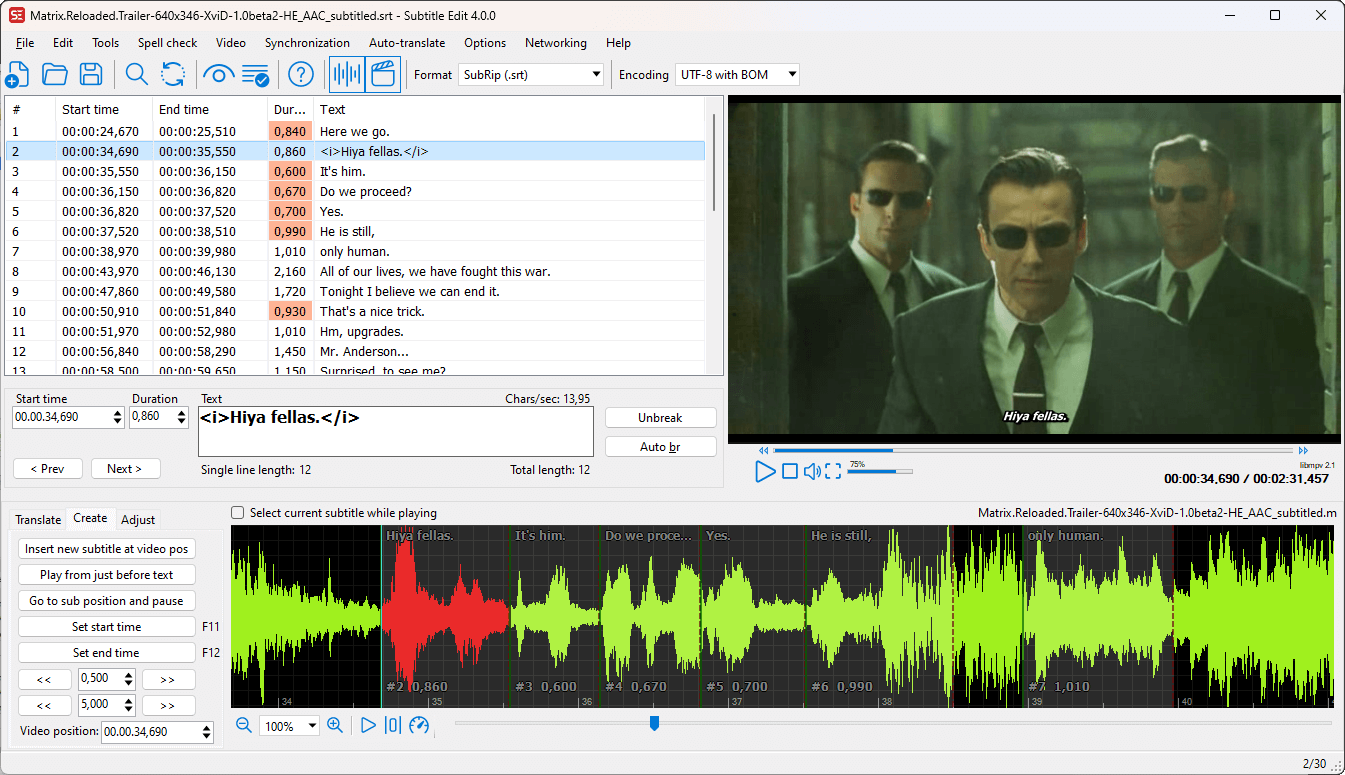
Subtitle Edit is the open-source Windows subtitle editor that has quietly become the strongest desktop pipeline for AI translation work. Whisper transcription runs locally with a choice of CPU or GPU back ends. Auto-translate routes finished subtitles through DeepL, Google, or ChatGPT. The waveform editor underneath the AI output is the kind of finishing tool the AI-only competitors don’t have.
Where it falls short: Windows only — the Linux port lags and macOS users go elsewhere. UI is dense and assumes the user knows what a frame rate is.
Pricing:
- Free: Fully free, GPLv3
Platforms: Windows (Linux beta)
Download: subtitleedit.org
Bottom line: First install on Windows for serious subtitle work.
2. MacWhisper — best macOS native Whisper
MacWhisper is the macOS-native Whisper GUI that Apple Silicon owners reach for. Models run on Metal, which means even the Large v3 model produces transcripts in something close to real time on an M-series Mac. The translation step pipes through OpenAI, DeepL, or your own model; output supports SRT, VTT, and TXT.
Where it falls short: Mac-only. The free tier limits which models you can run; the full Pro license is a one-time purchase.
Pricing:
- Free: Limited model selection
- Paid: One-time Pro license
Platforms: macOS
Download: goodsnooze.gumroad.com
Bottom line: The right pick for Mac users who don’t want to wrestle with command-line Whisper.
3. Buzz Captions — best cross-platform free Whisper GUI
Buzz Captions is the free, open-source Whisper desktop GUI that runs on Windows, macOS, and Linux. Pick a model, drop a file, get an SRT. Batch transcription handles a folder at a time. The Hugging Face integration pulls newer Whisper variants and fine-tunes without rebuilding from source.
Where it falls short: Built more for transcription than translation — the translate step depends on OpenAI API credit. Polished but lighter on the editing tooling than Subtitle Edit.
Pricing:
- Free: Fully free, MIT licensed
Platforms: Windows, macOS, Linux
Download: chidiwilliams.github.io
Bottom line: The pick for Linux users and anyone who wants Whisper on every desktop they use.
4. DeepL Translator — best for translating already-transcribed subtitles
DeepL Translator is the translation engine that the rest of the apps on this list plug into. The desktop client (Windows and macOS) accepts text, files, or clipboard input and returns translations that read more like a human draft than other engines. The API powers Subtitle Edit’s auto-translate and Bazarr’s translation provider.
Where it falls short: No transcription step — you need text in already. Pro plan is required for production volume; free tier caps monthly character count.
Pricing:
- Free: 500k characters/month
- Paid: Pro subscription tiers
Platforms: Windows, macOS
Download: deepl.com
Bottom line: The translation back end most subtitle workflows route through.
5. Bazarr — best server-side automation for Plex and Jellyfin
Bazarr is the Sonarr-Radarr companion that handles subtitles. Set per-library language profiles, point it at OpenSubtitles and Addic7ed providers, and Bazarr downloads matching subtitles for every show and movie automatically. The Whisper Provider lets it transcribe what no source has and translate what’s in the wrong language.
Where it falls short: Headless tool — desktop “use” means a browser tab on the server’s web UI. Setup spans Bazarr plus providers plus optionally a Whisper container.
Pricing:
- Free: Fully free, GPLv3
Platforms: Windows, macOS, Linux (container is the common deploy)
Download: bazarr.media
Bottom line: The pick for Plex and Jellyfin admins who don’t want to think about subtitles per file.
6. Aegisub — best for subtitle authoring and typesetting
Aegisub is the long-running anime fan-sub tool that survived because nothing else matches its ASS typesetting. AI tools generate the rough translation; Aegisub is where the karaoke styling, fade timings, and per-line override tags get added. The desktop builds for Windows, macOS, and Linux still receive community updates.
Where it falls short: No built-in AI step — feed it pre-translated output from one of the tools above. UI is from another decade.
Pricing:
- Free: Fully free, BSD-licensed
Platforms: Windows, macOS, Linux
Download: aegisub.org
Bottom line: The finishing tool for any release that ships with styled subtitles, not plain captions.
7. Whisper Desktop — best Windows GPU-accelerated Whisper
Whisper Desktop (also called Const-me Whisper) is the bare-bones Windows port that runs Whisper on DirectCompute, so AMD and Intel GPUs see the same acceleration as NVIDIA. For batch transcription on a Windows desktop without a high-end NVIDIA card, this is usually the fastest option.
Where it falls short: UI is minimal — pick model, pick file, run. No translation step inside the app; export the SRT to Subtitle Edit or DeepL.
Pricing:
- Free: Fully free, MPL-licensed
Platforms: Windows
Download: github.com/Const-me/Whisper
Bottom line: The pick for Windows users on AMD or Intel GPUs whose Buzz transcription runs on CPU.
How to pick the right one
- If you’re on Windows and want one app for the whole pipeline: Subtitle Edit
- If you’re on macOS and want a native GUI: MacWhisper
- If you want Whisper on every OS for free: Buzz Captions
- If you already have the transcript and need the translation: DeepL Translator
- If you run Plex or Jellyfin and want zero manual work: Bazarr
- If you’re authoring styled subtitles for a release: Aegisub
- If you have an AMD or Intel GPU and want it used: Whisper Desktop
FAQ
What is the best free AI subtitle translator? Subtitle Edit on Windows, MacWhisper trial on macOS, Buzz Captions on Linux. All run local Whisper for transcription; translation through DeepL or OpenAI adds quality at a per-character cost.
Can I translate anime subtitles with AI without paying? Yes. Whisper handles the transcription locally, and a free DeepL or Google Translate pass produces a draft good enough for casual viewing. Polished fan-sub quality still needs a human editing pass.
Is local Whisper as good as ChatGPT for translation? For transcription, yes — Whisper Large v3 matches or beats the paid alternatives. For translation, large language models still produce more natural prose than Whisper’s bundled translate mode.
Which app translates the fastest on a laptop GPU? Subtitle Edit with the GPU back end on Windows, MacWhisper on Apple Silicon, Whisper Desktop on AMD/Intel GPUs. Real-time-ratio depends on model size.
Can I use these tools commercially? Most are open-source, so the apps themselves are fine. The trained model weights and the translation API terms are where to check — Whisper is MIT, DeepL Pro and OpenAI both have published terms.