Docker Desktop changed its licensing in 2021 and the conversation around it never quite went away. Companies over a certain size now need a paid Docker subscription per developer for commercial use, and the app’s resource footprint on a 16 GB laptop is still measured in gigabytes of RAM at idle. The XDA piece on ditching Docker Desktop captured the typical journey: most developers keep it for one or two workflows it’s still best at, and move everything else to leaner alternatives.
We tested seven Docker Desktop alternatives across Mac, Windows, and Linux, focusing on what daily container work actually looks like: starting a runtime, building images, running compose stacks, debugging networking, and not bricking the machine in the process. Each pick is rated for compatibility with the standard Docker CLI, GUI quality, resource overhead, and which workflows it handles cleanly versus painfully.
Quick comparison
| App | Best for | Free plan | Starting price/mo | Standout feature |
|---|---|---|---|---|
| Podman Desktop | Daemonless containers | Yes | Free | Rootless by default |
| Rancher Desktop | Kubernetes + containers | Yes | Free | Bundled k3s |
| OrbStack | macOS, low overhead | Yes | $8 (commercial) | Fastest start, lowest RAM |
| Colima | macOS CLI users | Yes | Free | Minimal CLI wrapper for Lima |
| Lima | macOS Linux VMs | Yes | Free | Low-level VM control |
| Lazydocker | TUI for container ops | Yes | Free | Terminal UI for Docker |
| Portainer | Self-hosted GUI | Yes | $0.99 per node (Business) | Web UI for any Docker host |
Why people leave Docker Desktop
The friction shows up in a few places once a team has used Docker Desktop for a year:
- The commercial license that requires a paid Docker subscription for companies above 250 employees or $10M in revenue.
- The resource overhead — 2 to 4 GB of RAM at idle on a fresh install, before any container starts.
- The Mac performance on Apple Silicon for x86 images, where Rosetta translation and the qemu fallback both add noticeable latency.
- The update cadence that occasionally introduces breaking changes to networking or volume mounts between versions.
- The GUI weight for users who only ever interact through
docker composeand never click anything in the dashboard.
The 7 alternatives
1. Podman Desktop — best overall Docker Desktop alternative
Podman Desktop is the Red Hat-led GUI on top of Podman, the daemonless container runtime that’s API-compatible with Docker. The app handles image builds, compose stacks, Kubernetes pods, and remote connections to other Podman hosts. Most of Docker Desktop’s workflows translate directly because alias docker=podman is enough for the common cases.
Where it falls short: Docker Compose support uses a compatibility layer, so some advanced compose features are slightly off. macOS performance has improved a lot but still trails OrbStack on raw speed.
Pricing:
- Free / Open source
- Paid: None
Migrating from Docker Desktop: Uninstall Docker Desktop, install Podman Desktop, run podman machine init && podman machine start on Mac or Windows, then alias docker to podman in your shell. Compose files run via podman compose with minor edge cases.
Download: podman-desktop.io (Windows, Mac, Linux)
Bottom line: Pick Podman Desktop when you want the closest Docker Desktop replacement with no commercial license worries.
2. Rancher Desktop — best for Kubernetes alongside containers
Rancher Desktop by SUSE bundles a container runtime (containerd or dockerd) with a local k3s Kubernetes cluster. The same install gives you docker, kubectl, and helm working out of the box, which makes it the simplest path for developers who switch between plain containers and Kubernetes manifests during the day.
Where it falls short: Heavier than Podman Desktop or OrbStack because the k3s cluster runs even when you don’t need it. Some users disable Kubernetes and use just the container runtime, which works but feels like wasted install.
Pricing:
- Free / Open source
- Paid: None
Migrating from Docker Desktop: Install Rancher Desktop, pick dockerd as the runtime during setup, and existing Docker commands keep working. Compose files run unchanged.
Download: rancherdesktop.io (Windows, Mac, Linux)
Bottom line: Pick Rancher Desktop when your local workflow needs both Docker and Kubernetes without separate installs.
3. OrbStack — best for macOS performance
OrbStack is the macOS-exclusive replacement that boots in seconds, runs containers with noticeably lower RAM usage than Docker Desktop, and adds first-class Linux VM support in the same app. On Apple Silicon, x86 image performance is better than Docker Desktop’s qemu path thanks to Rosetta integration done well.
Where it falls short: macOS only — no Linux or Windows build. Commercial use requires a paid license above the personal-use threshold.
Pricing:
- Free: Personal use only
- Paid: A modest monthly fee per developer for commercial use
Migrating from Docker Desktop: Install OrbStack, sign in (or skip for personal use), and existing Docker commands work without changes. Compose files run unchanged. OrbStack ships its own docker CLI so the system Docker binary isn’t needed.
Download: orbstack.dev (Mac)
Bottom line: Pick OrbStack when you’re on macOS, want the fastest container experience, and the commercial license fits your team.
4. Colima — best for macOS CLI users
Colima is a minimal CLI wrapper around Lima that gives macOS a Docker-compatible container runtime in about 10 MB of install size. No GUI, no dashboard — just colima start and docker works. The resource footprint is the smallest in this comparison.
Where it falls short: No GUI at all. Compose UI exists only if you separately install Lazydocker or similar. Configuration lives in YAML files that you’ll edit by hand.
Pricing:
- Free / Open source
- Paid: None
Migrating from Docker Desktop: Install Colima via Homebrew (brew install colima docker docker-compose), run colima start, and existing Docker commands work. Compose files run unchanged.
Download: github.com/abiosoft/colima (Mac, Linux)
Bottom line: Pick Colima when you live in the terminal, are on macOS, and don’t want a GUI layer at all.
5. Lima — best for Mac users who need raw VMs
Lima is the Linux-on-Mac project that Colima sits on top of. Using Lima directly gives you finer control over the underlying VM (memory allocation, mount type, network mode), which matters for developers running heavier workloads than typical compose stacks.
Where it falls short: Configuration is YAML-heavy and the learning curve is steeper than Colima’s. macOS only (Linux is technically supported but pointless when native containers exist).
Pricing:
- Free / Open source
- Paid: None
Migrating from Docker Desktop: Install Lima, pick a Docker-flavored template, start the VM, and point your Docker CLI at it. The Lima docs walk through the migration in detail.
Download: lima-vm.io (Mac, Linux)
Bottom line: Pick Lima when you need fine-grained control over the underlying VM that Colima abstracts away.
6. Lazydocker — best terminal UI for Docker workflows
Lazydocker isn’t a Docker Desktop replacement — it’s the terminal UI you bolt on top of any container runtime to get a dashboard without a GUI app. Container lists, log tailing, image management, compose stack control, and stats all live in one TUI that runs over SSH.
Where it falls short: Doesn’t run containers itself — needs Docker, Podman, or another runtime underneath. Mouse support is limited compared with a real GUI.
Pricing:
- Free / Open source
- Paid: None
Migrating from Docker Desktop: Install Lazydocker alongside Podman Desktop, Colima, or Rancher Desktop. The TUI talks to whichever runtime is configured locally.
Download: github.com/jesseduffield/lazydocker (Windows, Mac, Linux)
Bottom line: Pick Lazydocker when you want a dashboard view of containers without a heavy GUI app on top of a lean runtime.
7. Portainer — best for self-hosted Docker management
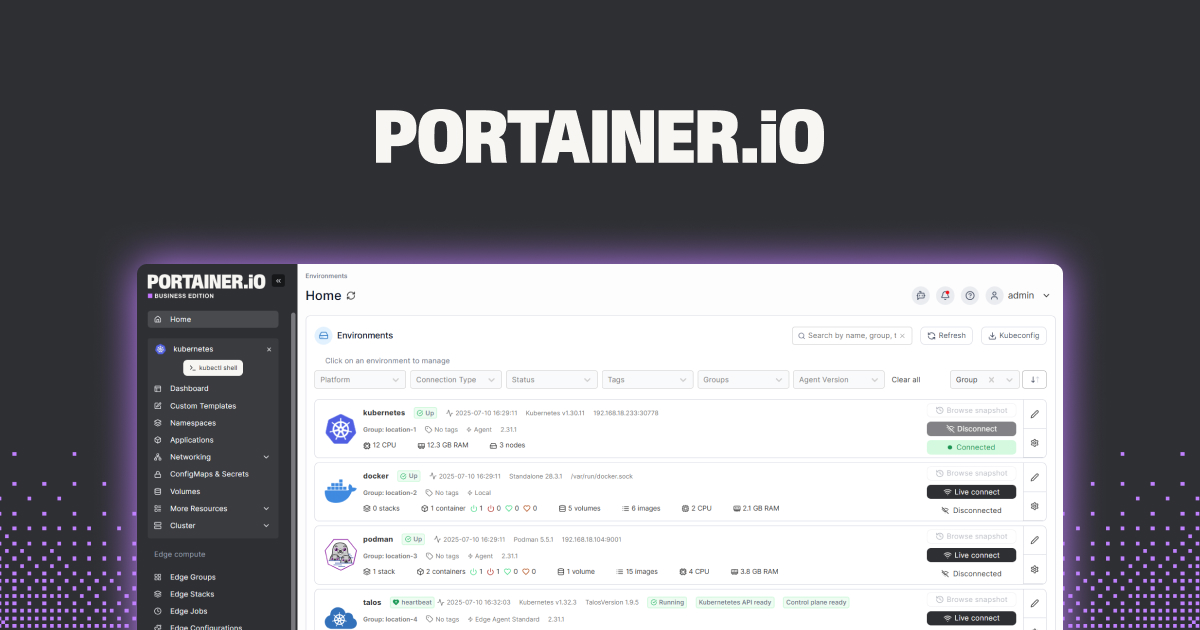
Portainer is the web UI for managing Docker, Swarm, and Kubernetes hosts. It runs as a container itself and gives you a browser-based dashboard for every container, image, network, and volume on the host. The same install can manage multiple remote Docker hosts from one UI.
Where it falls short: Free Community Edition is fully functional but lacks the role-based access control and audit logging that some teams need. Adds another container to your stack just to manage the others.
Pricing:
- Free: Community Edition
- Paid: Business Edition adds RBAC and support; pricing is per node, modest at small scale
Migrating from Docker Desktop: Spin up a Portainer container on any Docker host with docker run (one command from the docs), then point your browser at the local port. The desktop machine itself becomes a target Portainer manages.
Download: portainer.io (Web UI; runs on any Docker host)
Bottom line: Pick Portainer when you manage multiple Docker hosts and want one web dashboard instead of separate Docker Desktop installs.
How to choose
- For a drop-in Docker Desktop replacement without licensing worries: Podman Desktop
- For local Kubernetes work alongside containers: Rancher Desktop
- For the best macOS performance, with a paid commercial license: OrbStack
- For zero-GUI minimalism on macOS: Colima
- For raw VM control under the runtime: Lima
- For a TUI dashboard on top of any runtime: Lazydocker
- For managing multiple Docker hosts from a browser: Portainer
- Stay on Docker Desktop if you rely on Docker Scout, the built-in Dev Environments feature, or your team is locked into Docker’s commercial support and the licensing fits.
FAQ
Is Docker Desktop free?
Docker Desktop is free for personal use, education, non-commercial open-source projects, and small businesses under 250 employees and $10M in revenue. Commercial use above those thresholds requires a paid Docker subscription per developer. The CLI tools (docker, docker compose) by themselves remain free under the Apache license.
Can Podman replace Docker?
Yes for the majority of workflows. podman is a drop-in docker CLI replacement, Compose files run via podman compose, and image builds with podman build produce OCI images that Docker hosts run unchanged. Edge cases exist around Docker Swarm (Podman doesn’t replace it) and some networking quirks, but they’re rare in typical development.
What is the best free Docker Desktop alternative?
Podman Desktop is the closest fully free, fully open-source, cross-platform replacement. Colima is the lightest on macOS but has no GUI. Rancher Desktop is the right pick if Kubernetes is part of the daily workflow.
Why is Docker Desktop using so much RAM?
Docker Desktop runs a Linux VM (via WSL2 on Windows or HyperKit / qemu on Mac) plus a control plane. Even with no containers running, the VM and supporting processes reserve 2-4 GB of RAM. OrbStack, Colima, and Podman with podman machine all keep this overhead lower through tighter VM configuration.
Do I need Docker Desktop for Docker Compose?
No. docker compose (or docker-compose on older systems) runs against any Docker-compatible daemon. Compose works with Podman (podman compose), Colima, Rancher Desktop, and OrbStack without changes to the compose file in the typical case.